
Getting Started
What GAINS Connect is, your environments, checking your connection, and where to start for sending data, reading data and webhooks.
GAINS is a supply chain planning platform covering demand planning, inventory optimization and replenishment. GAINS Connect is its REST API for exchanging planning data with your systems. You load master and transactional data into GAINS, read planning results back, and receive webhooks when results change.
GAINS also supports file-based integration. This documentation covers the API only. Read this page first, then follow the links to the guide for each topic.
What GAINS Connect exchanges
Your ERP or other system of record pushes the data GAINS plans from, and pulls back the results: replenishment orders and the planning parameters GAINS optimizes.
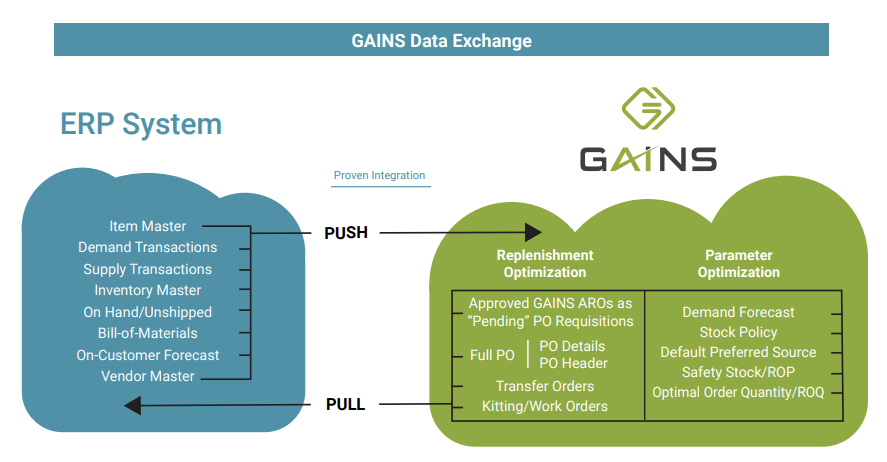
Typical data exchanged between an ERP system and GAINS
The diagram shows a typical integration. The endpoints available to you are listed in the API Reference, and your GAINS representative confirms which ones your project uses.
Before you start
Your GAINS representative gives you two things:
| You need | Details |
|---|---|
| Your environment's address | See Environments. |
| Credentials | A GAINS user name and password, or a client ID and secret for OAuth 2.0. See Authentication. |
Every endpoint path starts with /api/v1. Requests and responses are JSON: send Content-Type: application/json with every request that has a body. Field names are PascalCase, for example ItemCode and TaskId; see Data Formats & Conventions.
Environments
Each GAINS environment has its own GAINS Connect address and its own data.
- Address. Your environment is reached at
https://{env}.gainsystems.com, where{env}is the name your GAINS representative gives you, for examplehttps://acme.gainsystems.com/api/v1/ping. An on-premise installation uses its own host. - Token servers. Bearer tokens come from the GAINS authorization server, not from your environment: one server issues production tokens, another development tokens. Both are listed in Request a token. A token is valid only for the environment it was issued for.
- Test first. Build and test your integration against a non-production environment before you point it at production. Loads change planning data, and a webhook configuration starts sending data to your endpoint as soon as it is enabled. Ask your GAINS representative which environments you have and which credentials go with each.
Check your connection
Call GET /ping to confirm you can reach your environment. It needs no credentials, and ignores any you send.
GET /api/v1/ping HTTP/1.1
Host: acme.gainsystems.com{
"Status": "success",
"Version": "2026.10.1-968d6eb9",
"Config": {
"InboundEndpoints": true,
"Webhook": "v2",
"Mail": true
},
"Services": {
"GAINSX": {
"Version": "<installed GAINS X version>",
"Status": "success"
},
"LTP": {
"Version": "cloud",
"Status": "not-configured"
},
"SOA": {
"Version": "cloud",
"Status": "not-configured"
}
}
}The response tells you which GAINS Connect release your environment runs, whether it accepts data loads, and whether GAINS Connect can reach GAINS X and which version it runs. The API Reference describes every field. What the API answers when GAINS X is too old or unavailable is in GAINS Versions & Availability.
Authenticate
Every endpoint except GET /ping needs credentials. GAINS Connect accepts Basic authentication with a GAINS user, or a Bearer token issued by the GAINS authorization server. See Authentication.
How data moves
| Direction | How it works | Start with |
|---|---|---|
| Inbound: you send data to GAINS | POST a JSON array of records. GAINS Connect validates it, answers at once with a task, and loads the data in the background. | Loading Data |
| Outbound: you read data from GAINS | GET an endpoint. Results come back one page at a time. | Outbound Subjects |
| Webhooks: GAINS sends data to you | You register a URL. GAINS Connect posts changes in GAINS to it, grouped according to your delivery settings. | Webhooks |
Send data
POST /api/v1/skus HTTP/1.1
Host: acme.gainsystems.com
Authorization: Bearer eyJhbGciOiJSUzI1NiIsInR5cCIgOiAiSldUIiwia2lkIiA6ICJqTl9F...
Content-Type: application/json
Idempotency-Key: 6f1c2a4e-8d3b-4f5a-9b7e-2c1d0e9f8a76

[
  {
    "ItemCode": "ASM-7701",
    "Description": "Hub assembly, front",
    "Department": "HYD",
    "Group": "HUBS"
  }
]{
"Status": "Received",
"TaskId": "c81936e3-e41c-455a-bb9c-055e3c1b395c"
}A 202 means every record passed validation. A 207 or 422 lists rejected records; see Submit responses.
Use the TaskId with GET /tasks/{TaskId} to follow the load until it reaches a final status, such as Completed, Failed or Cancelled. To retry a submit safely, send an Idempotency-Key; see Idempotency.
Read data
Outbound endpoints return a Data array and a Paging block. Pass Paging.NextCursor back as the Cursor query parameter to fetch the next page; see Pagination.
Where next
- Sending data: Loading Data explains a submit, and Inbound Subjects lists what you can send.
- Reading data: Pull or Push helps you choose between reading endpoints and receiving webhooks, and Outbound Subjects lists what you can read.
- Receiving changes: Webhooks explains triggers and how to set one up.
- Terms: Glossary defines the GAINS terms the guides use.
The API Reference describes every endpoint, field and response. The Changelog lists what changed in each release.
Get help
- For credentials, environment addresses and configuration, contact your GAINS representative.
- When a request answers
500with anerror_id, send that ID to [email protected]. It lets support find the failure.
Related
- Authentication: get credentials and call the API with them
- Data Formats & Conventions: field names, value types, dates and times
- Errors & Retries: read an error and decide whether to retry
- GAINS Versions & Availability: version requirements and maintenance
- Glossary
Updated 4 days ago